Working with unstructured meshes in xESMF
xESMF can now build regridders from UGRID-style unstructured mesh inputs using mesh_in=True. This makes it possible to regrid face-centered data from an unstructured source mesh to a structured output grid. For real-world unstructured mesh files, we recommend using UXarray to read the mesh and normalize its topology metadata into a consistent UGRID-style representation before passing it to xESMF. UXarray is used in this notebook only as a
convenient way to load public example meshes; xESMF itself consumes xarray datasets with mesh coordinates and connectivity.
Currently supported:
Face-centered source data on mesh faces.
Mesh-to-structured-grid regridding.
Spherical longitude/latitude mesh coordinates.
Cartesian xyz mesh coordinates.
bilinear,patch,nearest_s2d, andnearest_d2smethods.UGRID-style
_FillValueandstart_indexmetadata on face-node connectivity.
Not yet supported:
Node-centered source data.
Edge-centered source data.
Mixed node/face coordinate geometry modes.
Conservative mesh regridding methods.
Mesh output grids.
[1]:
import numpy as np
import xarray as xr
import uxarray as ux
import xesmf as xe
import matplotlib.pyplot as plt
Download example mesh files
This notebook uses small public example files from the UXarray repository. The helper below downloads each file once and reuses it from a local cache on subsequent runs, so the example data do not need to be stored in the xESMF repository.
If you prefer, you can also download these files manually from the UXarray repository and pass the local file paths directly to ux.open_dataset.
[2]:
from pathlib import Path
from urllib.request import urlretrieve

CACHE_DIR = Path.home() / ".cache" / "xesmf-uxarray"
CACHE_DIR.mkdir(parents=True, exist_ok=True)


def fetch_uxarray_example(filename, base_url):
    """Download a UXarray example file once and reuse it from a local cache."""
    local_path = CACHE_DIR / filename
    if not local_path.exists():
        url = f"{base_url.rstrip('/')}/{filename}"
        print(f"Downloading {url}")
        urlretrieve(url, local_path)
    return local_path
Regridding a small MPAS example mesh
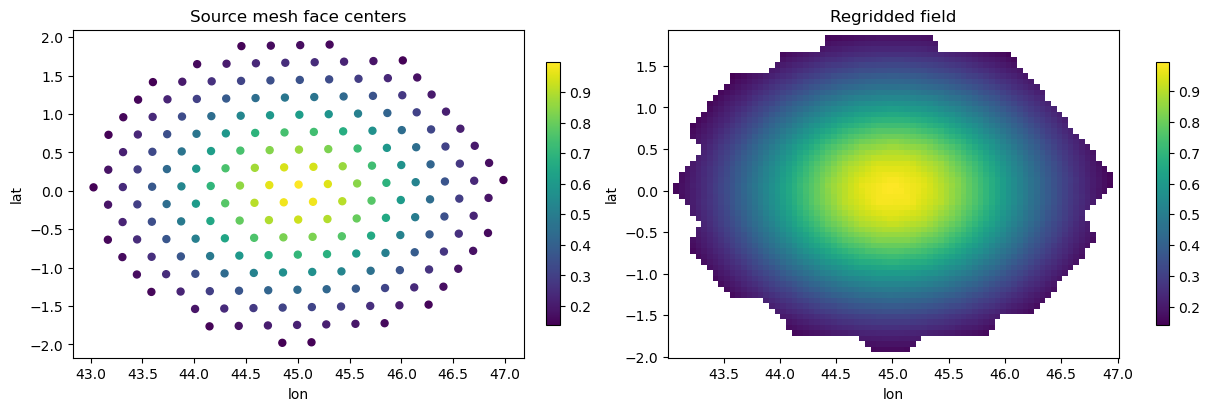
We start with a small subset of a 30 km MPAS atmosphere mesh from the UXarray example data repository. The example consists of a separate grid file and data file. UXarray reads the MPAS files and exposes the mesh in a normalized form with face centers, node coordinates, and face-node connectivity.
The data file contains face-centered example fields, including gaussian and inverse_gaussian, which makes it a compact test case for regridding from an unstructured mesh to a structured latitude-longitude grid.
[3]:
base_url = "https://raw.githubusercontent.com/UXARRAY/uxarray/main/test/meshfiles/mpas/dyamond-30km"

grid_path = fetch_uxarray_example("gradient_grid_subset.nc", base_url)
data_path = fetch_uxarray_example("gradient_data_subset.nc", base_url)

uxds = ux.open_dataset(grid_path, data_path)
uxds.data_vars
[3]:
Data variables:
    face_lat          (n_face) float32 780B ...
    face_lon          (n_face) float32 780B ...
    gaussian          (n_face) float32 780B ...
    inverse_gaussian  (n_face) float32 780B ...
Next, we define a simple structured latitude-longitude target grid covering the same longitude and latitude range as the source mesh. This will be the grid that the unstructured face-centered data are regridded onto.
[4]:
lon = np.linspace(
    float(uxds.uxgrid.face_lon.values.min()),
    float(uxds.uxgrid.face_lon.values.max()),
    80,
)
lat = np.linspace(
    float(uxds.uxgrid.face_lat.values.min()),
    float(uxds.uxgrid.face_lat.values.max()),
    60,
)

dst = xr.Dataset(
    coords={
        "lon": ("lon", lon),
        "lat": ("lat", lat),
    }
)
dst
[4]:
<xarray.Dataset> Size: 1kB
Dimensions:  (lon: 80, lat: 60)
Coordinates:
  * lon      (lon) float64 640B 43.03 43.08 43.13 43.18 ... 46.88 46.93 46.98
  * lat      (lat) float64 480B -1.98 -1.914 -1.848 -1.783 ... 1.772 1.838 1.903
Data variables:
*empty*[5]:
regridder = xe.Regridder(
    uxds,
    dst,
    "bilinear",
    mesh_in=True,
    unmapped_to_nan=True,
)
out = regridder(uxds["gaussian"])
[6]:
fig, axes = plt.subplots(1, 2, figsize=(12, 4), constrained_layout=True)

sc = axes[0].scatter(
    uxds.uxgrid.face_lon.values,
    uxds.uxgrid.face_lat.values,
    c=uxds["gaussian"].values,
    s=25,
    cmap="viridis",
)
axes[0].set_title("Source mesh face centers")
axes[0].set_xlabel("lon")
axes[0].set_ylabel("lat")
plt.colorbar(sc, ax=axes[0], shrink=0.8)

pcm = axes[1].pcolormesh(
    dst["lon"].values,
    dst["lat"].values,
    out.values,
    shading="auto",
    cmap="viridis",
)
axes[1].set_title("Regridded field")
axes[1].set_xlabel("lon")
axes[1].set_ylabel("lat")
plt.colorbar(pcm, ax=axes[1], shrink=0.8)
[6]:
<matplotlib.colorbar.Colorbar at 0x1770afcb0>
Regridding a larger MPAS-Ocean mesh
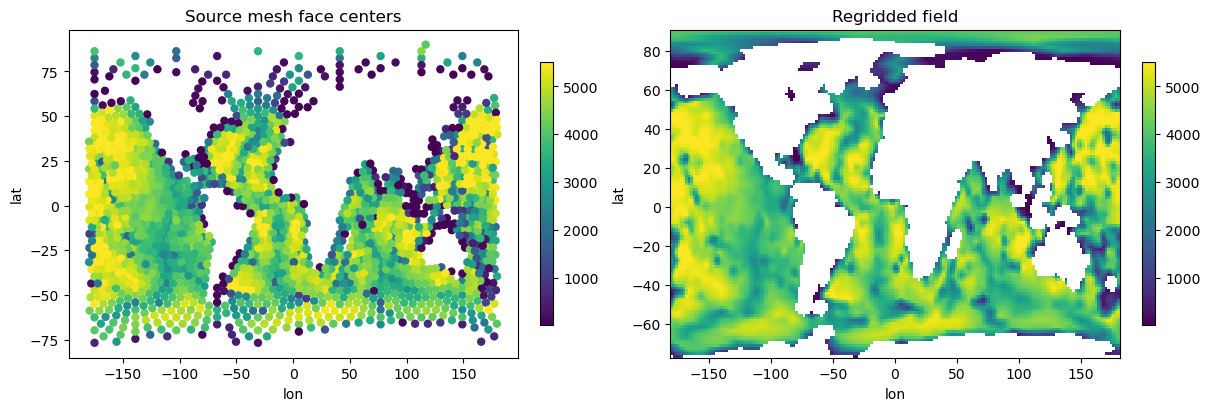
Next we apply the same workflow to a larger MPAS-Ocean example. The file contains both the mesh and the face-centered bottomDepth field. We use UXarray to read the file, convert the normalized mesh representation into xESMF’s explicit mesh input format, and regrid the field to a structured latitude-longitude grid. This example does not define an explicit source or target mask. For fields such as bottomDepth, adding an appropriate land/ocean mask can improve the behavior near coastlines
and unmapped regions. See the Masking notebook for more details on using masks with xESMF.
[7]:
BASE_URL = "https://raw.githubusercontent.com/UXARRAY/uxarray/main/test/meshfiles/mpas/QU"
FILENAME = "oQU480.231010.nc"

oqu_path = fetch_uxarray_example(FILENAME, BASE_URL)
uxds = ux.open_dataset(oqu_path, oqu_path)
uxds
[7]:
<xarray.UxDataset> Size: 5MB
Dimensions:                   (n_face: 1791, n_edge: 5754, n_node: 3947,
                               n_max_face_nodes: 6, maxEdges2: 12, TWO: 2,
                               vertexDegree: 3, nVertLevels: 60, Time: 1)
Dimensions without coordinates: n_face, n_edge, n_node, n_max_face_nodes,
                                maxEdges2, TWO, vertexDegree, nVertLevels, Time
Data variables: (12/55)
    latCell                   (n_face) float64 14kB ...
    lonCell                   (n_face) float64 14kB ...
    xCell                     (n_face) float64 14kB ...
    yCell                     (n_face) float64 14kB ...
    zCell                     (n_face) float64 14kB ...
    indexToCellID             (n_face) int32 7kB ...
    ...                        ...
    refTopDepth               (nVertLevels) float64 480B ...
    refZMid                   (nVertLevels) float64 480B ...
    refLayerThickness         (nVertLevels) float64 480B ...
    layerThickness            (Time, n_face, nVertLevels) float64 860kB ...
    ssh                       (Time, n_face) float64 14kB ...
    zMid                      (Time, n_face, nVertLevels) float64 860kB ...
Attributes:
    on_a_sphere:    YES
    sphere_radius:  6371229.0
    is_periodic:    NO
    parent_id:      kufh9o2jwx\nlsd2k42w1r\na4x6sqhkwb
    history:        Tue Oct 10 16:52:25 2023: ./convert.py\nMpasMeshConverter...
    mesh_spec:      1.0
    Conventions:    MPAS
    source:         MpasMeshConverter.x
file_id: 85scxk6tmk[8]:
lon = np.linspace(
    float(uxds.uxgrid.face_lon.values.min()),
    float(uxds.uxgrid.face_lon.values.max()),
    180,
)
lat = np.linspace(
    float(uxds.uxgrid.face_lat.values.min()),
    float(uxds.uxgrid.face_lat.values.max()),
    120,
)

dst = xr.Dataset(
    coords={
        "lon": ("lon", lon),
        "lat": ("lat", lat),
    }
)
dst
[8]:
<xarray.Dataset> Size: 2kB
Dimensions:  (lon: 180, lat: 120)
Coordinates:
  * lon      (lon) float64 1kB -179.8 -177.7 -175.7 -173.7 ... 175.9 177.9 180.0
  * lat      (lat) float64 960B -76.78 -75.38 -73.98 -72.58 ... 87.2 88.6 90.0
Data variables:
*empty*[9]:
regridder = xe.Regridder(
    uxds,
    dst,
    "bilinear",
    mesh_in=True,
    unmapped_to_nan=True,
)
out = regridder(uxds["bottomDepth"])
[10]:
fig, axes = plt.subplots(1, 2, figsize=(12, 4), constrained_layout=True)

sc = axes[0].scatter(
    uxds.uxgrid.face_lon.values,
    uxds.uxgrid.face_lat.values,
    c=uxds["bottomDepth"].values,
    s=25,
    cmap="viridis",
)
axes[0].set_title("Source mesh face centers")
axes[0].set_xlabel("lon")
axes[0].set_ylabel("lat")
plt.colorbar(sc, ax=axes[0], shrink=0.8)

pcm = axes[1].pcolormesh(
    dst["lon"].values,
    dst["lat"].values,
    out.values,
    shading="auto",
    cmap="viridis",
)
axes[1].set_title("Regridded field")
axes[1].set_xlabel("lon")
axes[1].set_ylabel("lat")
plt.colorbar(pcm, ax=axes[1], shrink=0.8)
[10]:
<matplotlib.colorbar.Colorbar at 0x30a4f7230>
Regridding a FESOM field
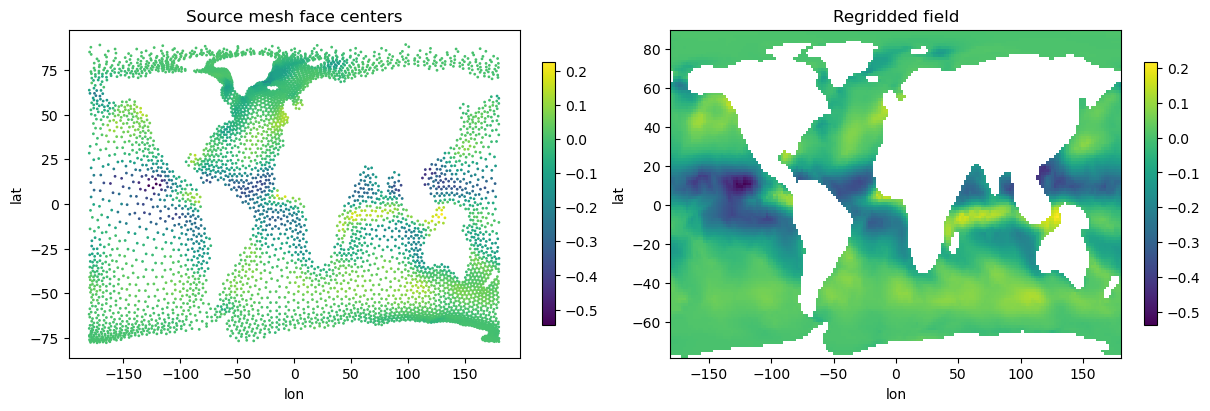
The previous examples used MPAS meshes. Here we repeat the same workflow with a FESOM 2.1 example from the UXarray test data repository. The mesh topology is stored in a separate UGRID-style mesh file, while the model output is stored in a separate data file.
This example uses the face-centered zonal velocity variable u. The variable is three-dimensional, with dimensions time, nz1, and n_face, so we select one time step and one vertical level before regridding.
Some FESOM variables in this example dataset, such as sst and a_ice, are node-centered rather than face-centered. The current xESMF mesh input path is focused on face-centered source data, so this example uses u, which is defined on mesh faces.
[11]:
BASE_URL = "https://raw.githubusercontent.com/UXARRAY/uxarray/main/test/meshfiles/ugrid/fesom"
MESH_FILENAME = "fesom.mesh.diag.nc"
DATA_FILENAME = "u.fesom.1948.nc"
mesh_path = fetch_uxarray_example(MESH_FILENAME, BASE_URL)
data_path = fetch_uxarray_example(DATA_FILENAME, BASE_URL)
[12]:
uxds = ux.open_dataset(mesh_path, data_path)
field = uxds["u"].isel(time=0, nz1=0)
field
[12]:
<xarray.UxDataArray 'u' (n_face: 5839)> Size: 47kB
[5839 values with dtype=float64]
Coordinates:
    nz1      float64 8B 2.5
    time     datetime64[ns] 8B 1948-01-01T23:45:00
Dimensions without coordinates: n_face
Attributes:
    description:  horizontal velocity
    long_name:    horizontal velocity
    units:        m/s
    location:     face
mesh: fesom_mesh[13]:
lon = np.linspace(
    float(uxds.uxgrid.face_lon.values.min()),
    float(uxds.uxgrid.face_lon.values.max()),
    180,
)
lat = np.linspace(
    float(uxds.uxgrid.face_lat.values.min()),
    float(uxds.uxgrid.face_lat.values.max()),
    120,
)

dst = xr.Dataset(
    coords={
        "lon": ("lon", lon),
        "lat": ("lat", lat),
    }
)
dst
OMP: Info #276: omp_set_nested routine deprecated, please use omp_set_max_active_levels instead.
[13]:
<xarray.Dataset> Size: 2kB
Dimensions:  (lon: 180, lat: 120)
Coordinates:
  * lon      (lon) float64 1kB -179.9 -177.9 -175.9 -173.9 ... 175.9 177.9 179.9
  * lat      (lat) float64 960B -77.87 -76.46 -75.06 ... 86.51 87.92 89.32
Data variables:
*empty*[14]:
regridder = xe.Regridder(
    uxds,
    dst,
    "bilinear",
    mesh_in=True,
    unmapped_to_nan=True,
)
out = regridder(field)
/Users/ali/xESMF/xesmf/frontend.py:309: UserWarning: face_node_connectivity start_index metadata is inconsistent with the connectivity values; falling back to inferred start_index=0
  warnings.warn(
This warning is important !!! Always check the connectivity metadata when working with real-world mesh files. Some workflows may normalize connectivity values but leave metadata behind, for example zero-based connectivity values with
start_index=1. xESMF validates the connectivity range and resolves the effectivestart_indexwhen possible.
[15]:
fig, axes = plt.subplots(1, 2, figsize=(12, 4), constrained_layout=True)

sc = axes[0].scatter(
    uxds.uxgrid.face_lon.values,
    uxds.uxgrid.face_lat.values,
    c=field.values,
    s=1,
    cmap="viridis",
)
axes[0].set_title("Source mesh face centers")
axes[0].set_xlabel("lon")
axes[0].set_ylabel("lat")
plt.colorbar(sc, ax=axes[0], shrink=0.8)

pcm = axes[1].pcolormesh(
    dst["lon"].values,
    dst["lat"].values,
    out.values,
    shading="auto",
    cmap="viridis",
)
axes[1].set_title("Regridded field")
axes[1].set_xlabel("lon")
axes[1].set_ylabel("lat")
plt.colorbar(pcm, ax=axes[1], shrink=0.8)
[15]:
<matplotlib.colorbar.Colorbar at 0x30a706e40>
Regridding an ICON mesh
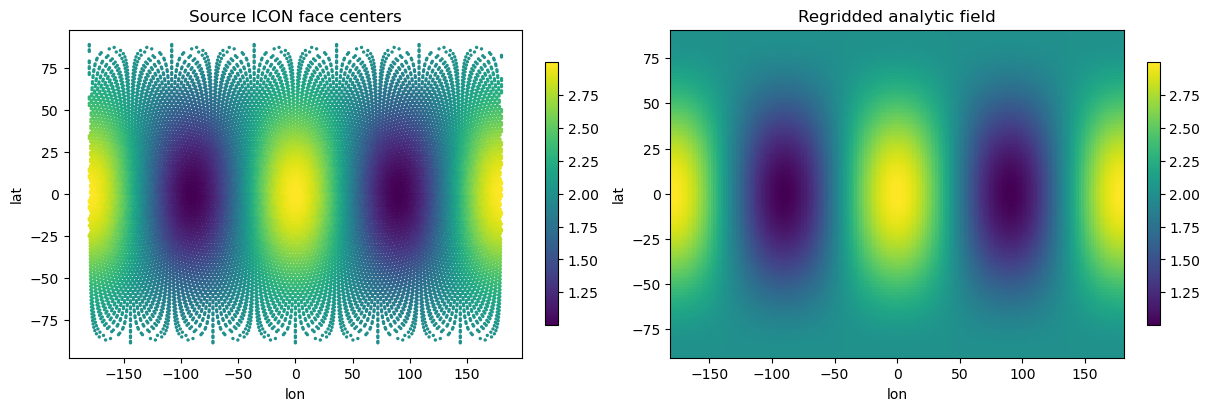
As a final example, we use an ICON grid file. ICON uses an icosahedral unstructured grid: the sphere is covered by triangular cells derived from refinements of an icosahedron. This differs from the MPAS and FESOM examples above, and provides another useful check that xESMF can consume UGRID-style mesh topology from different model families.
This file contains the grid description but no physical model output field. To test the regridding workflow, we create a synthetic face-centered analytic field from the ICON face-center longitude and latitude coordinates, then regrid it to a structured latitude-longitude grid.
[16]:
BASE_URL = "https://raw.githubusercontent.com/UXARRAY/uxarray/main/test/meshfiles/icon/R02B04"
FILENAME = "icon_grid_0010_R02B04_G.nc"
path = fetch_uxarray_example(FILENAME, BASE_URL)
uxds = ux.open_dataset(path, path)
uxds
[16]:
<xarray.UxDataset> Size: 15MB
Dimensions:                        (n_face: 20480, n_max_face_nodes: 3,
                                    n_node: 10242, ne: 6, n_edge: 30720, no: 4,
                                    two: 2, two_grf: 2, cell_grf: 14,
                                    max_chdom: 1, edge_grf: 24, vert_grf: 13,
                                    vert_delaunay: 3, cell_delaunay: 40956)
Coordinates:
    clon                           (n_face) float64 164kB ...
    clat                           (n_face) float64 164kB ...
    vlon                           (n_node) float64 82kB ...
    vlat                           (n_node) float64 82kB ...
    elon                           (n_edge) float64 246kB ...
    elat                           (n_edge) float64 246kB ...
Dimensions without coordinates: n_face, n_max_face_nodes, n_node, ne, n_edge,
                                no, two, two_grf, cell_grf, max_chdom,
                                edge_grf, vert_grf, vert_delaunay, cell_delaunay
Data variables: (12/63)
    clon_vertices                  (n_face, n_max_face_nodes) float64 492kB ...
    clat_vertices                  (n_face, n_max_face_nodes) float64 492kB ...
    vlon_vertices                  (n_node, ne) float64 492kB ...
    vlat_vertices                  (n_node, ne) float64 492kB ...
    elon_vertices                  (n_edge, no) float64 983kB ...
    elat_vertices                  (n_edge, no) float64 983kB ...
    ...                             ...
    parent_edge_index              (n_edge) int32 123kB ...
    child_edge_index               (no, n_edge) int32 492kB ...
    child_edge_id                  (n_edge) int32 123kB ...
    phys_cell_id                   (n_face) int32 82kB ...
    phys_edge_id                   (n_edge) int32 123kB ...
    cc_delaunay                    (vert_delaunay, cell_delaunay) int32 491kB ...
Attributes: (12/21)
    title:                ICON grid description
    history:              /e/uhome/dreinert/icon/build/sx9
    institution:          Max Planck Institute for Meteorology/Deutscher Wett...
    source:               icon-dev
    uuidOfHGrid:          66a341d2-1dcf-11b2-880c-0f1645f3d1dc
    number_of_grid_used:  10
    ...                   ...
    inverse_flattening:   0.0
    grid_level:           4
    grid_root:            2
    grid_ID:              1
    parent_grid_ID:       0
max_childdom: 1Here we build an analytic field
[17]:
face_lon = uxds.uxgrid.face_lon.values
face_lat = uxds.uxgrid.face_lat.values
analytic = xe.data.wave_smooth(face_lon, face_lat)
[18]:
lon = np.linspace(-180.0, 180.0, 180)
lat = np.linspace(-90.0, 90.0, 120)

dst = xr.Dataset(
    coords={
        "lon": ("lon", lon),
        "lat": ("lat", lat),
    }
)
[19]:
regridder = xe.Regridder(
    uxds,
    dst,
    "bilinear",
    mesh_in=True,
    unmapped_to_nan=True,
)
out = regridder(analytic)
[20]:
fig, axes = plt.subplots(1, 2, figsize=(12, 4), constrained_layout=True)

sc = axes[0].scatter(
    uxds.uxgrid.face_lon.values,
    uxds.uxgrid.face_lat.values,
    c=analytic,
    s=2,
    cmap="viridis",
)
axes[0].set_title("Source ICON face centers")
axes[0].set_xlabel("lon")
axes[0].set_ylabel("lat")
plt.colorbar(sc, ax=axes[0], shrink=0.8)

pcm = axes[1].pcolormesh(
    dst["lon"].values,
    dst["lat"].values,
    out,
    shading="auto",
    cmap="viridis",
)
axes[1].set_title("Regridded analytic field")
axes[1].set_xlabel("lon")
axes[1].set_ylabel("lat")
plt.colorbar(pcm, ax=axes[1], shrink=0.8)
[20]:
<matplotlib.colorbar.Colorbar at 0x30e5841a0>