Comparison of seven regridding algorithms
xESMF exposes seven different regridding algorithms from the ESMF library:
bilinear:ESMF.RegridMethod.BILINEARconservative:ESMF.RegridMethod.CONSERVEconservative_2nd:ESMF.RegridMethod.CONSERVE_2NDconservative_normed:ESMF.RegridMethod.CONSERVEpatch:ESMF.RegridMethod.PATCHnearest_s2d:ESMF.RegridMethod.NEAREST_STODnearest_d2s:ESMF.RegridMethod.NEAREST_DTOS
where conservative_normed is just the conservative method with the normalization set to ESMF.NormType.FRACAREA instead of the default norm_type=ESMF.NormType.DSTAREA.
This notebook demonstrates how these algorithms behave in different situations.
Notes
bilinearandconservativeshould be the most commonly used methods. They are both monotonic (i.e. will not create new maximum/minimum).conservative_2ndalso requires cell bounds, but may overshoot source minimum/maximum values.Nearest neighbour methods, either source to destination (s2d) or destination to source (d2s), could be useful in special cases. Keep in mind that d2s is highly non-monotonic.
Patch is ESMF’s unique method, producing highly smooth results but quite slow.
From the ESMF documentation:
The weight \(w_{ij}\) for a particular source cell \(i\) and destination cell \(j\) are calculated as \(w_{ij}=f_{ij} * A_{si}/A_{dj}\). In this equation \(f_{ij}\) is the fraction of the source cell \(i\) contributing to destination cell \(j\), and \(A_{si}\) and \(A_{dj}\) are the areas of the source and destination cells.
For
conservative_normed,… then the weights are further divided by the destination fraction. In other words, in that case \(w_{ij}=f_{ij} * A_{si}/(A_{dj}*D_j)\) where \(D_j\) is fraction of the destination cell that intersects the unmasked source grid.
Detailed explanations are available on ESMPy documentation.
Preparation
[1]:
%matplotlib inline
import matplotlib.pyplot as plt
import cartopy.crs as ccrs
import numpy as np
import xarray as xr
import xesmf as xe

method_list = [
    "bilinear",
    "conservative",
    "conservative_2nd",
    "conservative_normed",
    "nearest_s2d",
    "nearest_d2s",
    "patch",
]
[2]:
ds_in = xe.util.grid_global(20, 15)  # input grid
ds_fine = xe.util.grid_global(4, 4)  # high-resolution target grid
ds_coarse = xe.util.grid_global(30, 20)  # low-resolution target grid
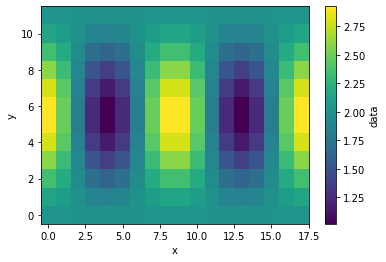
Make a wave field that is widely used in regridding benchmarks.
[3]:
ds_in["data"] = xe.data.wave_smooth(ds_in["lon"], ds_in["lat"])
ds_in
[3]:
<xarray.Dataset> Size: 9kB
Dimensions:  (y: 12, x: 18, y_b: 13, x_b: 19)
Coordinates:
    lon      (y, x) float64 2kB -170.0 -150.0 -130.0 ... 130.0 150.0 170.0
    lat      (y, x) float64 2kB -82.5 -82.5 -82.5 -82.5 ... 82.5 82.5 82.5 82.5
    lon_b    (y_b, x_b) float64 2kB -180.0 -160.0 -140.0 ... 140.0 160.0 180.0
    lat_b    (y_b, x_b) float64 2kB -90.0 -90.0 -90.0 -90.0 ... 90.0 90.0 90.0
Dimensions without coordinates: y, x, y_b, x_b
Data variables:
data (y, x) float64 2kB 2.016 2.009 1.997 1.987 ... 1.997 2.009 2.016[4]:
ds_in["data"].plot()
[4]:
<matplotlib.collections.QuadMesh at 0x1497f41aba10>
[5]:
def regrid(ds_in, ds_out, dr_in, method):
    """Convenience function for one-time regridding"""
    regridder = xe.Regridder(ds_in, ds_out, method, periodic=True)
    dr_out = regridder(dr_in)
    return dr_out
When dealing with global grids, we need to set periodic=True, otherwise data along the meridian line will be missing.
Increasing resolution
[6]:
for method in method_list:
    print(method)
    %time ds_fine[method] = regrid(ds_in, ds_fine, ds_in['data'], method)
    print('')
bilinear
CPU times: user 411 ms, sys: 131 ms, total: 542 ms
Wall time: 884 ms

conservative
CPU times: user 57.5 ms, sys: 3.2 ms, total: 60.7 ms
Wall time: 60.8 ms

conservative_2nd
CPU times: user 105 ms, sys: 3.43 ms, total: 108 ms
Wall time: 109 ms

conservative_normed
CPU times: user 53.6 ms, sys: 1.26 ms, total: 54.9 ms
Wall time: 53.9 ms

nearest_s2d
CPU times: user 9.94 ms, sys: 1.01 ms, total: 11 ms
Wall time: 10.9 ms

nearest_d2s
CPU times: user 5.04 ms, sys: 0 ns, total: 5.04 ms
Wall time: 5.07 ms

patch
CPU times: user 188 ms, sys: 1.93 ms, total: 190 ms
Wall time: 190 ms
Nearest neighbour algorithms are very fast while the patch method is quite slow.
[7]:
fig, axes = plt.subplots(4, 2, figsize=[8, 10])

for i, method in enumerate(method_list):
    ax = axes.flatten()[i]
    ds_fine[method].plot.pcolormesh(ax=ax)
    ax.set_title(method, fontsize=15)

for ax in axes.flatten()[len(method_list) :]:
    ax.set_visible(False)

plt.tight_layout()
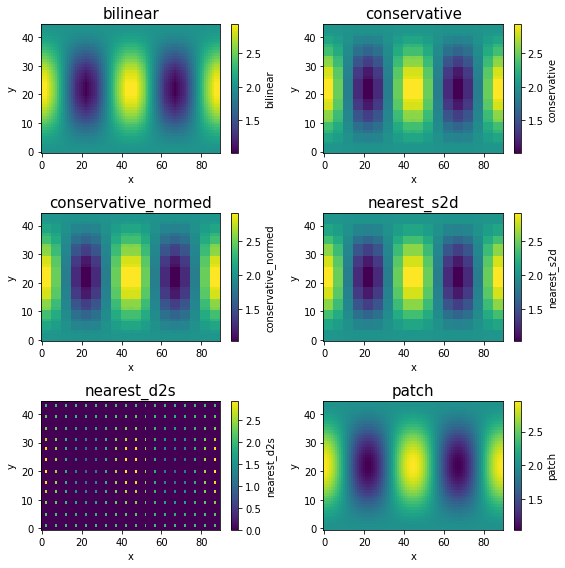
When regridding from low-resolution to high-resolution, bilinear and patch will produce smooth results, while conservative and nearest_s2d will preserve the original coarse grid structure (although the data is now defined on a finer grid.).
nearest_d2s is quite different from others: One source point can be mapped to only one destination point. Because we have far less source points (on a low-resolution grid) than destination points (on a high-resolution grid), most destination points cannot receive any data so they just have zero values. Only the destination points that are closest to source points can receive data.
Decreasing resolution
[8]:
for method in method_list:
    ds_coarse[method] = regrid(ds_in, ds_coarse, ds_in["data"], method)
[9]:
fig, axes = plt.subplots(4, 2, figsize=[8, 10])

for i, method in enumerate(method_list):
    ax = axes.flatten()[i]
    ds_coarse[method].plot.pcolormesh(ax=ax)
    ax.set_title(method, fontsize=15)
for ax in axes.flatten()[len(method_list) :]:
    ax.set_visible(False)
plt.tight_layout()
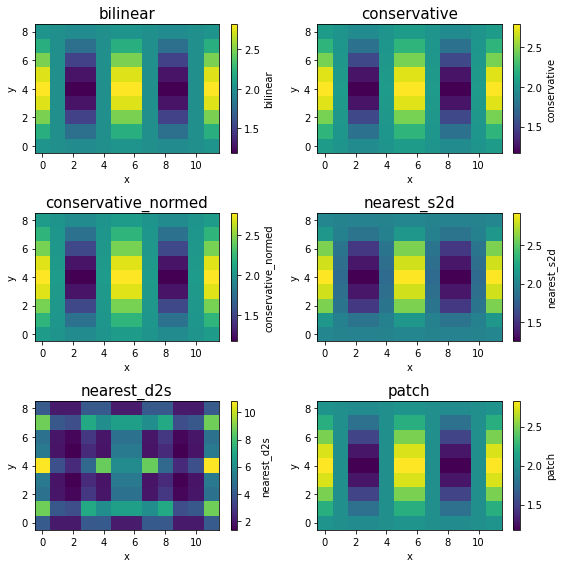
When regridding from high-resolution to low-resolution, all methods except nearest_d2s produce similar results here. But that’s largely because the input data is smooth. For real-world data, it is generally recommended to use conservative for decreasing the resolution, because it takes average over small source grid boxes, while bilinear and nearest_s2d effectively throw away most of source grid boxes.
nearest_d2s is again different: Every source point has to be mapped to a destination point. Because we have far more source points (on a high-resolution grid) than destination points (on a low-resolution grid), a single destination point will receive data from multiple source points, which can accumulate to a large value (notice the colorbar range).